Top FAQs About Income-Driven Repayment Plans

Having trouble making your monthly federal student loan payment? On an income-driven repayment (IDR) plan, your monthly payment is based on your income and family size or number of dependents. Applying is free.
This article will answer these common questions:
- What are IDR plans?
- What are the pros and cons of IDR plans?
- Am I eligible for an IDR plan?
- What are the monthly payments and repayment periods on different IDR plans?
- How can I confirm which repayment plan I’m enrolled in?
- How can I compare my repayment plan options?
- How do I apply for an IDR plan?
- How can I check the status of my IDR application?
- What if my income or family size (or number of dependents) changes when I’m already enrolled in an IDR plan?
- When am I required to recertify my IDR plan?
- How does IDR autorecertification work?
- How do I sign up for IDR autorecertification?
- Will I be taxed if my student loans are discharged under an IDR plan?
- Can I enroll in auto pay while on an IDR plan?
1
What are IDR plans?
IDR plans are federal student loan repayment plans that base your monthly payment on your income and family size or number of dependents, rather than on how much you owe.
This is different from fixed payment repayment plans, where you pay a fixed monthly payment over a set amount of time. Payments on a fixed payment repayment plan are based on your loan balance and interest rate and will completely pay off your loan by the end of your repayment period.
IDR plans can make repayment more manageable for borrowers whose federal student loan debt is high compared to their income. As your income increases, your monthly payment will, too. At the end of your repayment period on certain IDR plans, you may be eligible to have your remaining loan balance discharged.
The IDR plans that are available to you will depend on the types of federal student loans you have and the dates they were first paid out (known as the disbursement dates).
While the U.S. Department of Education (ED) administers IDR plans, the core requirements for federal student loan repayment plans are controlled by federal law. That means Congress establishes the eligibility rules.
Not sure which type of loan you have or when it was disbursed? Learn how to use your StudentAid.gov account Dashboard to check your loan type, loan balance, monthly payment amount, and repayment plan for your federal student loans.
If All of Your Loans Were Disbursed On or After July 1, 2026
If all of your loans were disbursed on or after July 1, 2026, the only IDR plan available to you is the Repayment Assistance Plan (RAP).
Direct PLUS Loans for parents can’t be repaid under RAP. This includes
- Direct PLUS Loans for parents (also known as parent PLUS loans),
- Direct Consolidation Loans that paid off a parent PLUS loan, and
- Direct Consolidation Loans that paid off a Direct Consolidation Loan that paid off a parent PLUS loan (sometimes referred to as a double consolidation).
If All of Your Loans Were Disbursed Before July 1, 2026
Depending on your loan type, you may be able to choose from multiple IDR plans, including RAP. Check the eligibility table to see which plans you may be eligible for.
If You Have a Mix of Loan Types and Disbursement Dates
If you have a mix of loan types and disbursement dates, your loans may be eligible to be repaid under two different IDR plans. Check the eligibility table to review which student loans you can repay under each IDR plan.
2
What are the pros and cons of IDR plans?
Review some pros and cons of being on an IDR plan.
| Pros | Cons |
|
|
|
|
|
|
|
|
3
Am I eligible for an IDR plan?
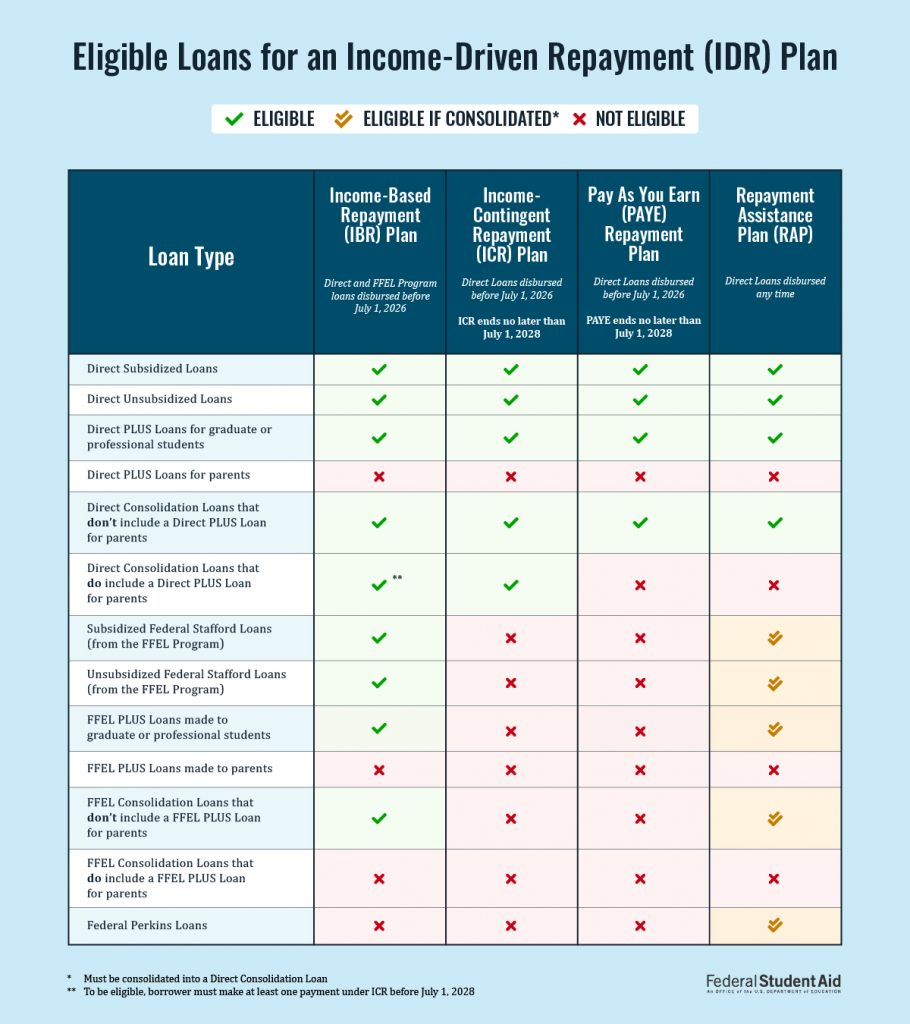
Many borrowers with federal student loans are eligible for at least one IDR plan, but the type of loans you received and when you received your loans can affect your plan eligibility. Review loan eligibility requirements to see which plan or plans you qualify for:
- Income-Based Repayment (IBR) Plan
- Income-Contingent Repayment (ICR) Plan
- Pay As You Earn (PAYE) Repayment Plan
- Repayment Assistance Plan (RAP)
ED will retire the PAYE and ICR plans will be retired no later than July 1, 2028.
To check your loan type, log in to StudentAid.gov and visit your Dashboard. In some cases, you might need to consolidate your student loans to be eligible for a specific plan.
A federal court order ended the Saving on a Valuable Education (SAVE) Plan, and it is no longer available to borrowers. If you’re enrolled in SAVE or have a pending SAVE application, you must choose a new repayment plan. Learn more on IDR-related court actions, and look for an email from your loan servicer telling you your deadline to choose a different repayment plan.
Parent Borrowers
If you currently have only parent PLUS loans, your loans aren’t eligible to be repaid under an IDR plan.
However, you may be eligible for an IDR plan if you had parent PLUS loans that you consolidated into a Direct Consolidation Loan before July 1, 2026.
Borrowers With Defaulted Loans
Defaulted loans are not eligible for any IDR plan.
However, if you complete loan rehabilitation and make all the payments within the time frame outlined in your loan rehabilitation agreement, you may become eligible for an IDR plan once your loan is no longer in default. Learn about loan rehabilitation for borrowers with defaulted loans.
Another option you can explore is to consolidate your defaulted federal student loan (or loans) into a Direct Consolidation Loan and agree to repay the new Direct Consolidation Loan under RAP. Learn about consolidating a defaulted federal student loan.
4
What are the monthly payments and repayment periods on different IDR plans?
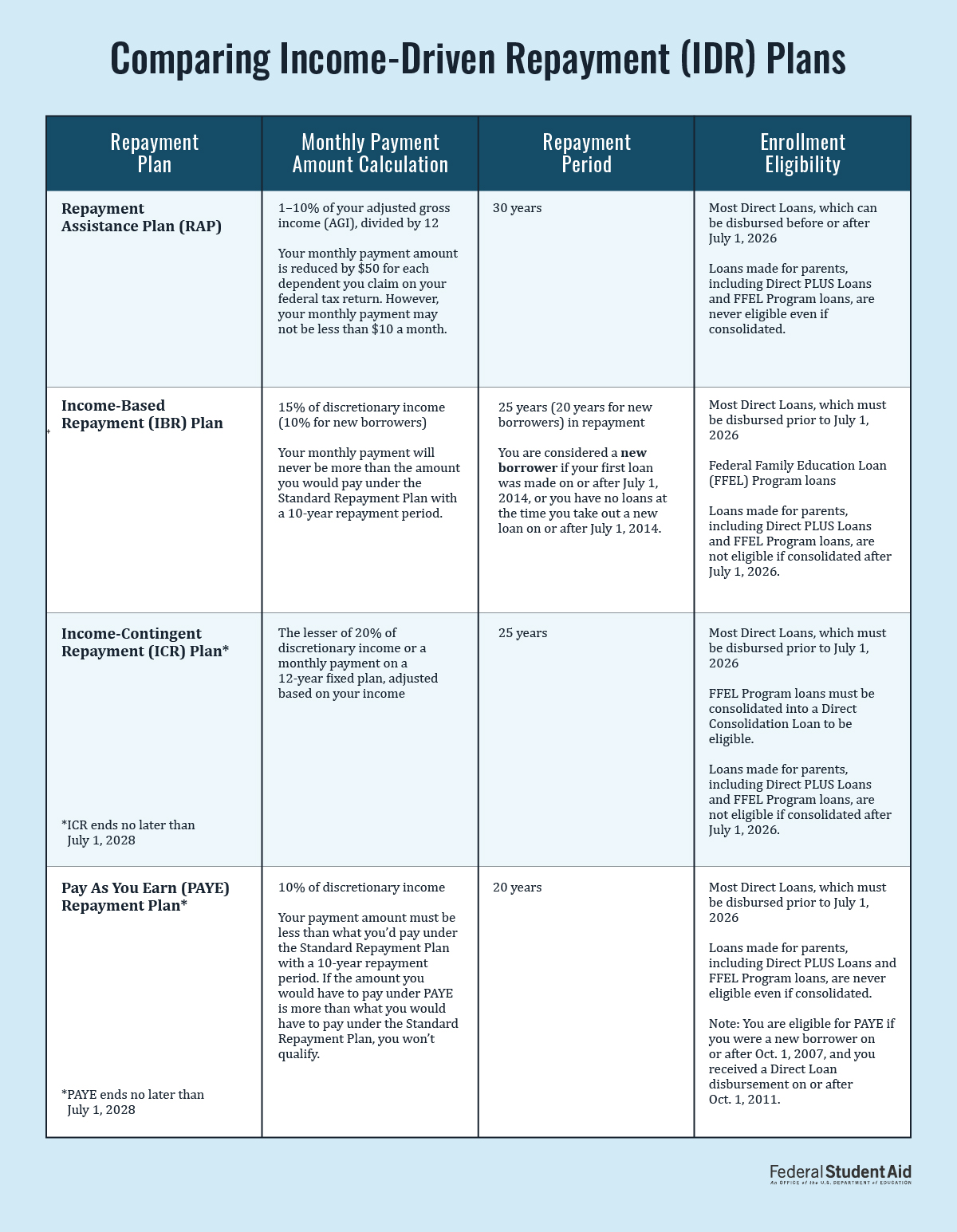
The table below compares how your monthly payment amount is calculated under each IDR plan and the repayment period for each plan. The repayment period for an IDR plan is the amount of time you have to make full, on-time payments before your loans can be discharged. The table also lists general eligibility requirements.
On an IDR plan, every full and on-time payment you make toward PSLF will be considered a qualifying monthly payment. Learn more about PSLF on our FAQ page.
5
How can I confirm which repayment plan I’m enrolled in?
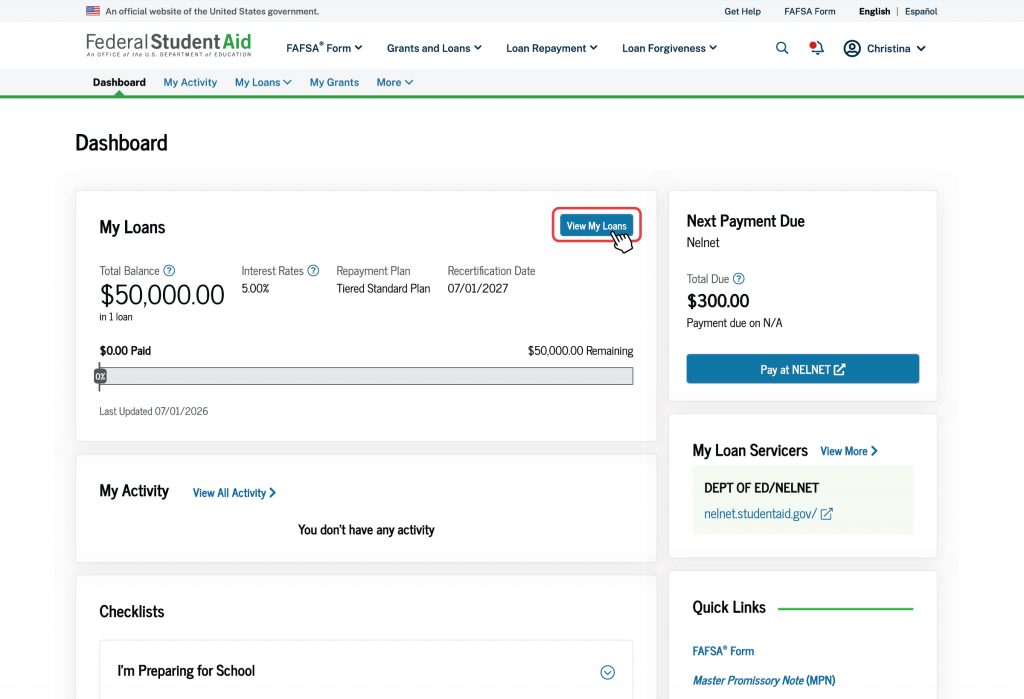
To check which repayment plan you’re currently enrolled in, log in to StudentAid.gov. You’ll be taken to your account Dashboard, where you can view details about your federal student loans.
Under the “My Loans” section, you’ll see your repayment plan, total balance, interest rate, and the amount left to repay.
It may take 7–14 days to update your StudentAid.gov Dashboard after you make changes with your servicer. If you recently switched repayment plans, please allow some time for the update to appear in your StudentAid.gov Dashboard and on your loan servicer’s website.
6
How can I compare my repayment plan options?
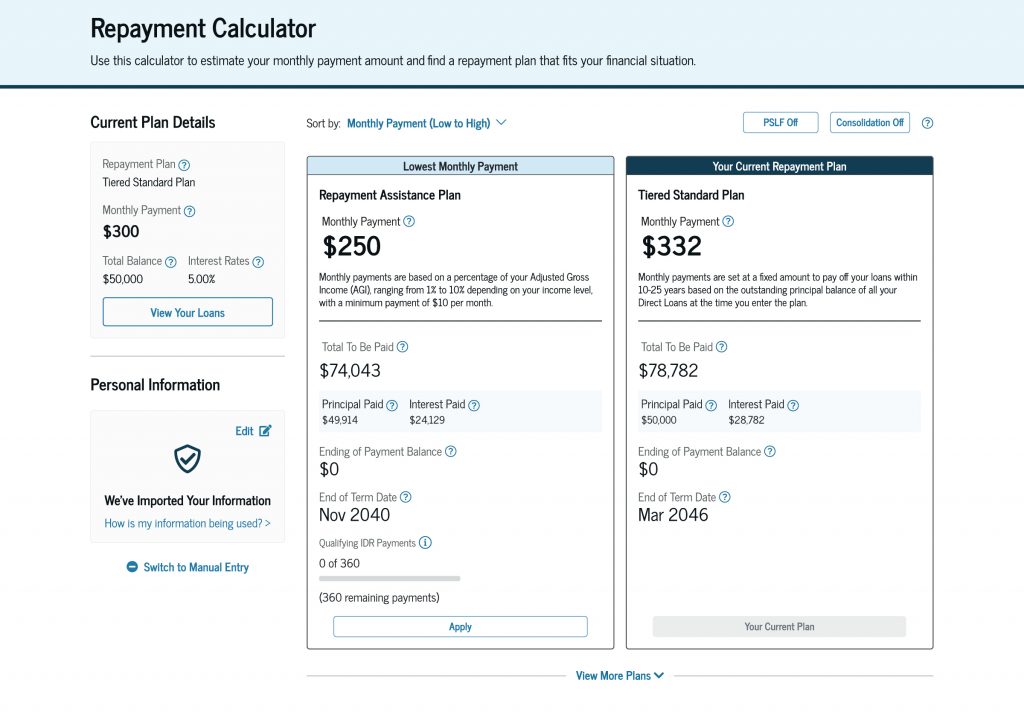
Use the Repayment Calculator to explore your repayment plan options. This tool can help you estimate your
- monthly payment amount,
- repayment period,
- the total amount you’ll pay over the life of your loan , and
- any projected PSLF or IDR discharge amount.
We recommend logging in to your StudentAid.gov account when you’re using the Repayment Calculator so your federal student loan information automatically populates in the calculator, and you can check which plans you’re eligible for. You’ll also have the option to give your consent and approval to import your financial information from the Internal Revenue Service (IRS)—if you’re eligible to use this feature—into the Repayment Calculator.
If you prefer to manually enter your financial details instead of having your tax information imported, you can enter basic information about your income, family size or number of dependents, tax filing status, and state of residence. The Repayment Calculator will show you what plans you’ll be eligible for and your estimated monthly student loan payments on these plans.
If you think you won’t be able to afford your estimated monthly payments on an IDR plan, review your options.
7
How do I apply for an IDR plan?
It’s free to apply for an IDR plan. Get started by submitting an IDR Plan Request at StudentAid.gov/idr. If you cannot complete the online application, you may submit the official IDR plan request form and required income documentation to your loan servicer.
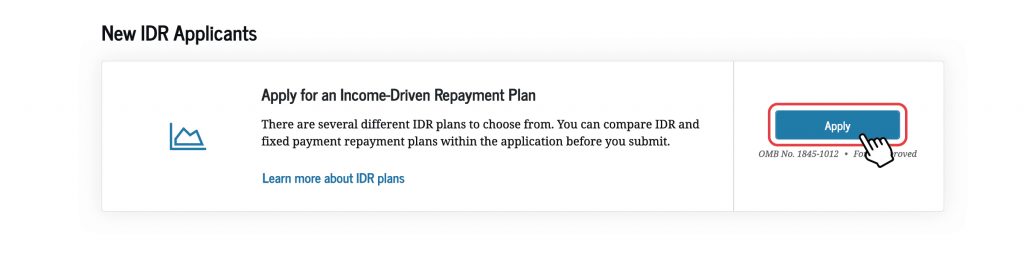
To apply for an IDR plan, you’ll need to provide income information. If you have Direct Loans, the easiest way to do this within the IDR application is by providing consent for us to securely access your financial information directly from the IRS. You can do this by selecting “Provide Approval” under the “Authorization To Retrieve Federal Tax Information” section of the application.
Providing consent to import your federal financial information to your IDR application allows us to process your application faster and will save you time in the future since we’ll be able to automatically recertify your IDR plan each year (more on this in a bit). Alternatively, you can provide documentation of income, such as your most recent tax return. If you didn’t file taxes, other acceptable income documentation includes paystubs or a letter from your employer. If you’re in your grace period (i.e., the six-month period before you’re required to start making monthly payments after you graduate, leave school, or drop below half-time enrollment), you can apply for an IDR plan online 60 days before your grace period ends.
If you wish to begin making payments under an IDR plan before your deferment or forbearance is over, you can use the online IDR application to ask your loan servicer to end your deferment or forbearance early. You also can use the application to request to be put on an IDR plan when your deferment or forbearance ends.
8
How can I check the status of my IDR application?
Loan servicers process most IDR applications within a few weeks, but sometimes it can take longer.
To check the status of your IDR Plan Request, log in to your StudentAid.gov account to view your “My Activity” page.
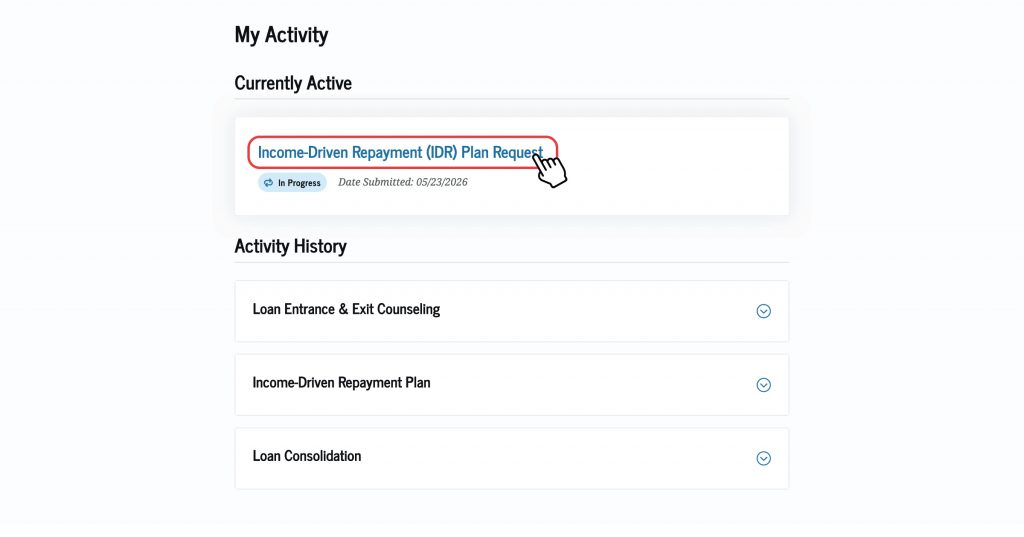
You might see one of the following statuses:
- Draft
- In Progress
- Canceled
- In Review
- Action Required
- Completed
If you’re required to manually provide a signature because your servicer doesn’t support e-signature functionality, you’ll see the “Action Required” status.
To view more status details, select your IDR application.
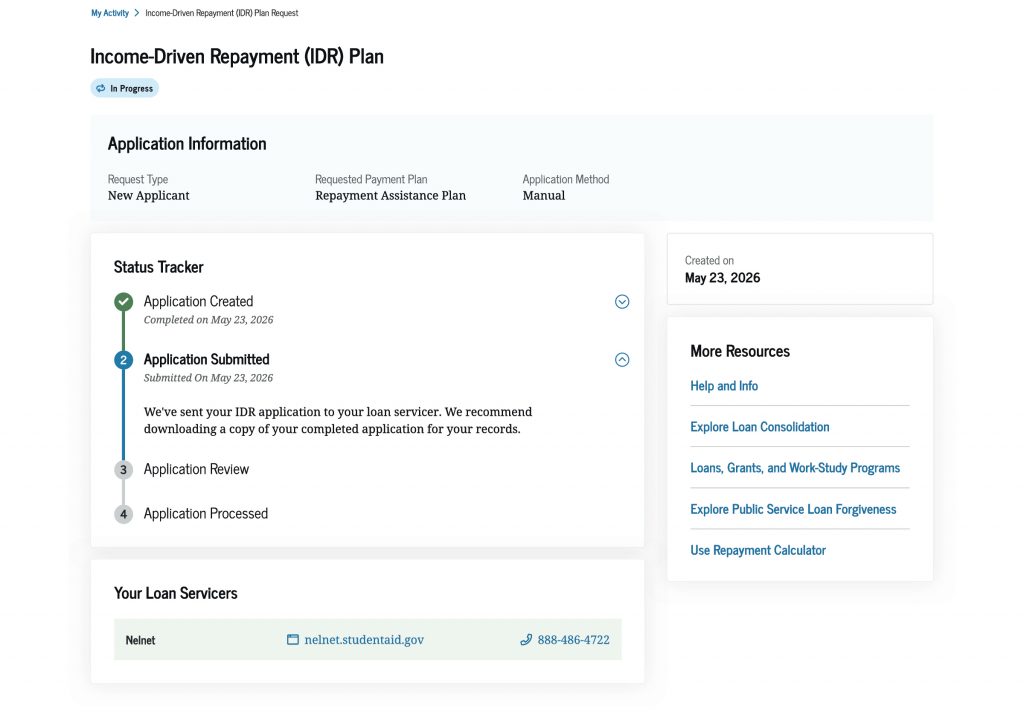
“Manual” will appear for all applications other than those created through auto recertification.
Your loan servicer may place you into a forbearance category known as “processing forbearance” if the servicer needs additional time to process your IDR application, recalculate your monthly payments on an IDR plan, or update your income. Processing forbearances won’t last longer than 60 days. Learn about the different types of forbearances.
9
What if my income or family size (or number of dependents) changes when I’m already enrolled in an IDR plan?
If your IDR plan’s monthly payment amount doesn’t reflect your current situation (e.g., if you were recently laid off or your family size or number of dependents increased), you can submit updated information to request that your monthly payment be recalculated. This may lower your monthly payment amount.
There are two ways to submit information to support your request:
- (Recommended) Log in to your StudentAid.gov account and select “Manage Your Plan” on the “IDR Plan Request” page.
- Submit documentation to your loan servicer directly through their website.
When asked about your finances—either on the online form or by your loan servicer—answer the questions based on your situation as of the day you’re reporting your information.
Income Documentation Requirements
- Include documentation of pay frequency if you’re submitting paystubs (e.g., twice per month or every other week) and at least one piece of documentation for each source of taxable income.
- The date of any supporting documentation you provide must be no older than 90 days from the date you sign the IDR Plan Request. Tax returns are the only exception to this rule and can be up to a year old at the point of submission.
- Copies of documentation are acceptable.
10
When am I required to recertify my IDR plan?
You’re required to recertify your IDR plan by updating your income and family size (or number of dependents) once per year. To recertify your plan, you’ll need to submit another IDR Plan Request or sign up for autorecertification if you’re eligible (more on this shortly).
You can view your IDR recertification date by logging in to your account Dashboard. In the “My Loans” section of your Dashboard, you’ll see your recertification date listed. This information is also available on your “My Loans” page.
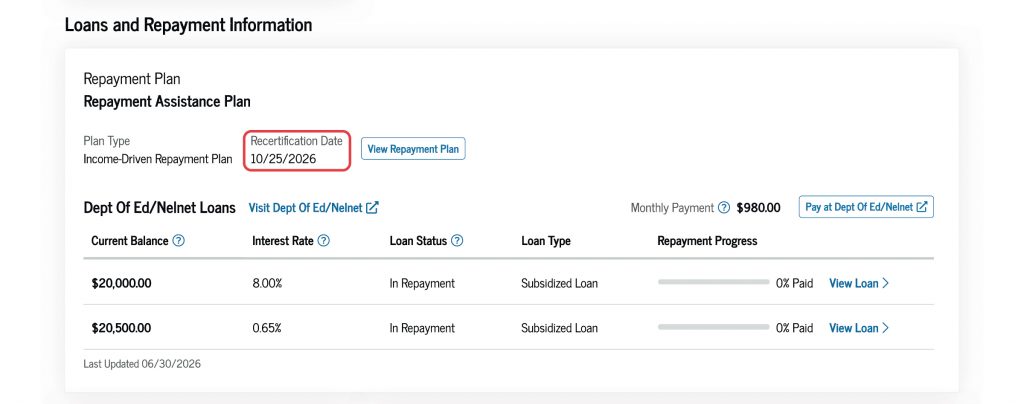
You must submit your recertification before the date shown because it takes time for servicers to process your IDR recertification. We recommend that you submit your recertification 90 days before your recertification date. If you’re logged in to your StudentAid.gov account, you also can select the owl icon in the bottom right corner of the screen to ask our virtual assistant, Aidan®, to confirm your recertification date.
You must recertify your IDR plan by your specified deadline to avoid consequences. Not recertifying on time could increase your monthly payment amount since your payments will no longer be based on your income and family size or number of dependents.
11
How does IDR autorecertification work?
The easiest way to recertify your IDR plan (i.e., update your income and family size or number of dependents) every year is to provide consent for us to access your financial information. If you’re eligible, we can securely retrieve your information from the IRS and automatically recertify your IDR plan by your recertification date; this process is also known as autorecertification.
Autorecertification begins 120 days before your IDR recertification date. You’ll receive a system-generated email informing you about the status of your IDR plan autorecertification. After ED and your loan servicer process your autorecertification, you’ll see a PDF document on the “My Activity” page of your account Dashboard with your recertification information.
If your autorecertification results in a new monthly payment amount, your loan servicer will notify you about any changes and send you an updated billing statement at least 21 days before your payment is due.
Remember: Autorecertification uses your latest information on file with the IRS. If your income has significantly changed since your last tax return, go to the “What if my income or family size (or number of dependents) changes when I’m already enrolled in an IDR plan?” section of this article for information about steps you should take.
12
How do I sign up for IDR autorecertification?
If you’re filling out a new IDR application, you can provide your consent for us to access your financial information under the “Authorization To Retrieve Federal Tax Information” section of the application.
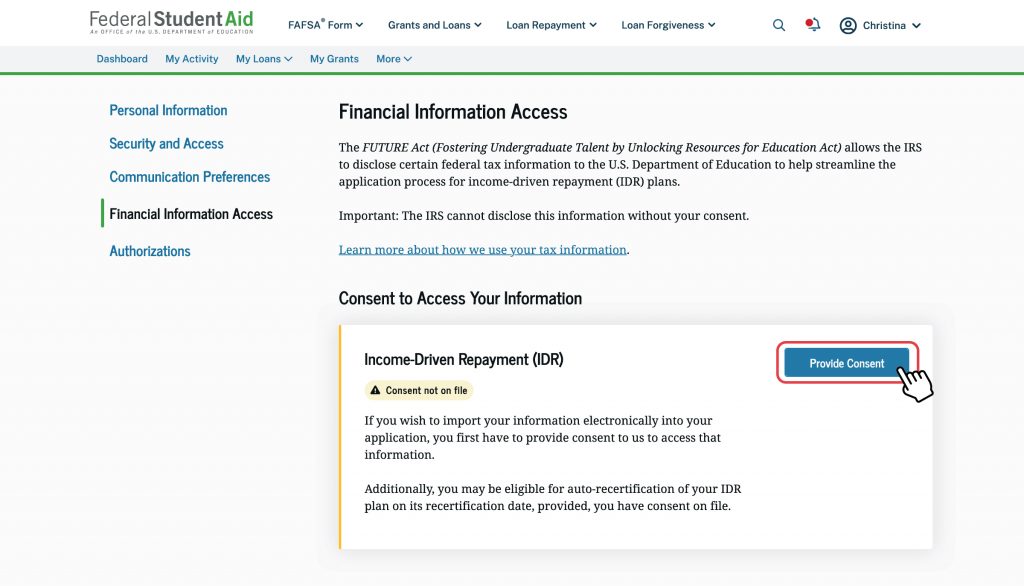
If you aren’t submitting an updated IDR application, but you want to enable autorecertification (or check if you’ve already done so), follow these steps:
- Log in to your StudentAid.gov Dashboard.
- Select the arrow beside your name (top-right corner) and then select “Settings” from the dropdown list.
- Select “Financial Information Access” on the left side of your screen.
- If consent is not on file, select the “Provide Consent” button.
- After reading the “Authorization To Retrieve Federal Tax Information” agreement, select the blue “Provide Approval” button.
- The next page will confirm your change, and you’ll see “Consent on file” listed under the “Income-Driven Repayment (IDR)” header.
Note: To remove your consent, follow the steps listed above and select “Revoke Consent” at Step 4.
13
Will I be taxed if my student loans are discharged under an income-driven repayment (IDR) plan?
At the end of the repayment period for an IDR plan any balance you haven’t paid off may be forgiven. If your loan is eligible for discharge, we’ll notify you, and you’ll have 21 days to opt out of this forgiveness. If you opt out, you must continue making monthly payments until you fully repay your loan balance.
How taxes may apply to your IDR discharge:
| Date of the last payment of your IDR plan repayment period | Federal taxes | State taxes | What it means for you |
| Between Jan. 1, 2021, and Dec. 31, 2025 | Not taxed | Depends on your state * | You won’t owe federal taxes, but some states may still treat the discharged amount as income. States vary—some follow federal rules, and others have their own rules. |
| On or after Jan. 1, 2026 | Taxed as income | Likely taxed * | Your discharged balance might increase your taxable income and could result in a tax bill at both the federal and state levels. Many states follow federal tax rules. |
State tax rules vary and might change. Consult your state tax agency for the most current information. Before your forgiveness date, consider speaking with a tax professional to understand your individual situation.
If you live in Alaska, Florida, Nevada, New Hampshire, South Dakota, Tennessee, Texas, Washington, or Wyoming—which have no state income tax—you won’t owe state taxes on your discharged federal student loans.
14
Can I enroll in auto pay while on an IDR plan?
Yes, you can enroll in auto pay while on an IDR plan, and your loan servicer can automatically deduct your payment from your bank account on time each month.
Starting on July 1, 2026, federal student loan borrowers enrolled in auto pay will enjoy a 1% interest rate reduction! Borrowers enrolled in auto pay by Dec. 31, 2026, (or those who are already enrolled) will benefit from this interest rate reduction through June 30, 2028.
On auto pay, you’ll get a reminder ahead of each withdrawal. Sign up for auto pay (for free!) on your loan servicer’s website:
You never have to pay for help with your federal student loans. Learn how to avoid student aid scams.
More Resources
If you have questions about IDR plans, check out these resources:
- “Who’s My Loan Servicer?” page: Federal student loan servicers manage your loans and are a free, helpful resource if you have questions about your repayment plan options.
- “Income-Driven Repayment Plans” page: Get details about available IDR plans.
- “One Big Beautiful Bill Act Updates” page: Stay up-to-date about changes to IDR plans as a result of the 2025 law.
- “IDR Plan Court Actions: Impact on Borrowers” page: Learn what actions borrowers should take now that a court order ended the SAVE Plan.
Published: August 2026