Student Loan Rehabilitation for Borrowers in Default: FAQs
If you defaulted on a federal student loan, you may have the option to rehabilitate your loan to get out of default. After you complete loan rehabilitation, the default status will be removed from your loan, collection of payments will stop, and you’ll be eligible to receive federal student aid again.
In this article, we cover the following common questions about loan rehabilitation:
- What is loan rehabilitation?
- What would my monthly payment be if I enter into a loan rehabilitation agreement?
- How do I sign up for loan rehabilitation to get out of default?
- How do I confirm that I’m enrolled in a loan rehabilitation agreement?
- How can I make an online payment on my defaulted student loans?
- How can I view my involuntary and voluntary payments toward my defaulted student loans?
- How do I confirm that I fulfilled my loan rehabilitation agreement?
1
What is loan rehabilitation?
Loan rehabilitation is one of the ways to get a federal student loan out of default. When your loan is rehabilitated, the default status will be removed and collections will stop. Additionally, you’ll regain benefits that were available on your loan before you defaulted.
To start the loan rehabilitation process, you must enter into a loan rehabilitation agreement by signing a Rehabilitation Agreement Letter. Your first step is to contact your loan holder and provide the required documentation. Then you must make nine on-time, voluntary payments within the time frame outlined in your agreement.
Direct Loan or Federal Family Education Loan (FFEL) Program borrowers must make the nine payments during a period of 10 consecutive months in order to successfully complete loan rehabilitation. This means you may miss one payment in a 10-month period. However, borrowers with defaulted Federal Perkins Loans must make nine consecutive payments to complete loan rehabilitation.
Be sure to compare all your options to get out of default before deciding to begin loan rehabilitation.
2
What would my monthly payment be if I enter into a loan rehabilitation agreement?
Under a standard loan rehabilitation agreement, your monthly payment amount will be equal to 15% of your annual discretionary income, divided by 12.
The best way to get an estimate of what your monthly payment would be under this standard 15% formula is to contact the U.S. Department of Education’s Default Resolution Group, the loan servicer for federal student loans in default.
3
How do I sign up for loan rehabilitation to get out of default?
To sign up for loan rehabilitation, you must enter into a loan rehabilitation agreement with your loan holder. For most borrowers, your loan holder will be the U.S. Department of Education’s Default Resolution Group (DRG). If you’re not sure who your loan holder is, log in to your StudentAid.gov account and scroll down to the “My Loan Servicers” section. If you have a FFEL Program loan, then you will be assigned a guaranty agency, which you will see listed under “My Loan Servicers.”
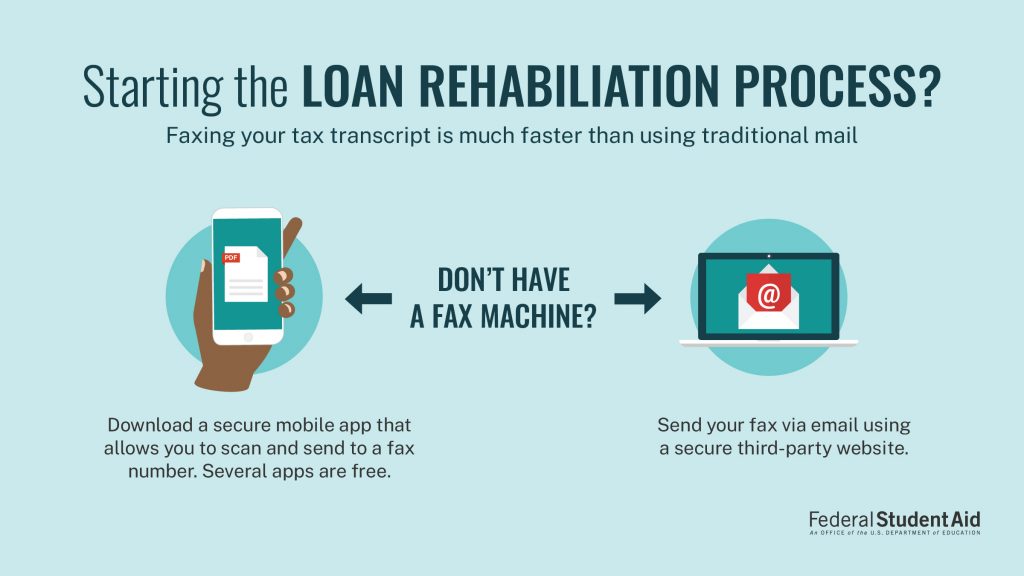
After confirming your loan holder, you will need to mail or fax one of the following documents to request a rehabilitation agreement:
- Your latest tax transcript (no signature needed). You can request your tax transcript online.
- A copy of your IRS Form 1040 federal tax return for the most recent tax year (both pages). However, your Form 1040 must be signed by hand. A signature created by a computer (typed or electronic) will not be accepted. If you live with your spouse but file taxes separately, you will need to include your spouse’s tax return as well.
If you don’t have access to a printer, head to your local library. Many libraries offer free printing, and some offer faxing.
If your loan servicer is DRG (the most common loan servicer for defaulted federal student loans), submit your documentation by fax or postal mail.
Fax number: 1-240-931-3323
Mailing address:
U.S. Department of Education
Default Resolution Group
P.O. Box 5609
Greenville, TX 75403-5609
If you have FFEL Program loans and your loan is held by a guaranty agency, then your application and documentation should be sent to that agency, not DRG. As a reminder, to determine your guaranty agency, visit the “My Loan Servicers” section of your StudentAid.gov account. View guaranty agency contact information.
4
How do I confirm that I’m enrolled in a loan rehabilitation agreement?
Within 10 business days of receiving your information, the U.S. Department of Education (ED) will send you a loan rehabilitation agreement via postal mail, and your online account on MyEdDebt.ed.gov will be updated.
Note: MyEdDebt.ed.gov is the official ED website for borrowers with defaulted federal student loans. If your loan has been transferred to DRG, you’ll need to create a MyEdDebt.ed.gov account using your Social Security number. Your existing StudentAid.gov account username and password will not work on MyEdDebt.ed.gov. Learn what information you can find on your MyEdDebt.ed.gov Dashboard.
The loan rehabilitation agreement you receive in the mail will include your calculated monthly payment amount, payment options, and the terms of the agreement. If the documentation you provided wasn’t sufficient, the letter will tell you what documentation is needed to establish an approved payment schedule. The full agreement won’t be available online—it will be delivered via postal mail only.
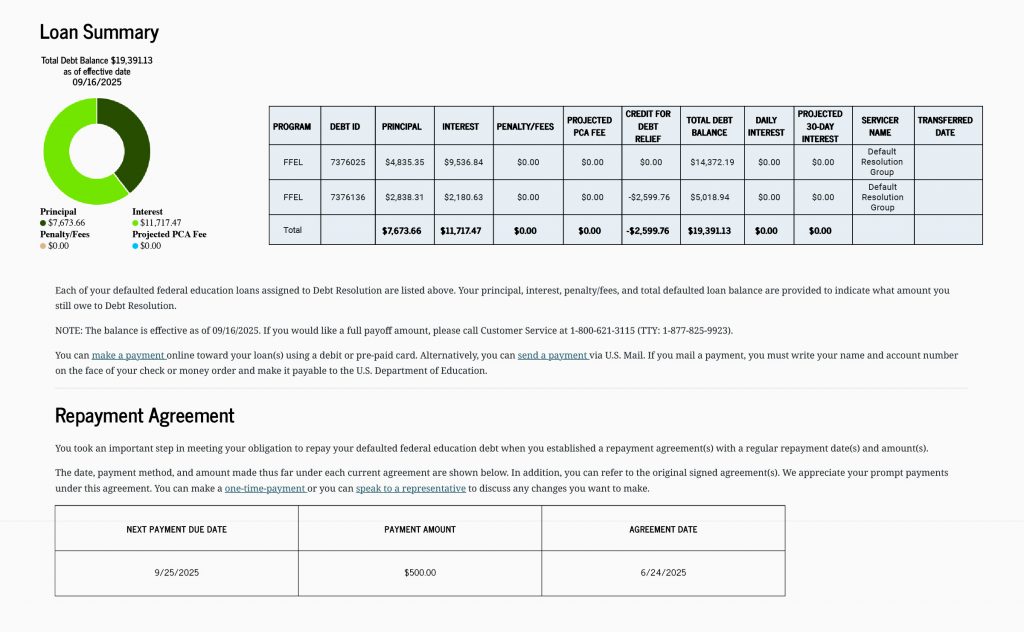
After you log in to your new account on MyEdDebt.ed.gov, you can select the “Loan Summary” tab on your Dashboard to see the “Repayment Agreement” section. This section will list a summary of when your loan rehabilitation agreement began (the payment schedule creation date), your next payment due date, and the amount you must pay.
If you can’t afford the payment, read below to learn what steps you should take to request an alternative monthly payment amount.
5
How can I make an online payment on my defaulted student loans?
Under the “My Account” section of your MyEdDebt.ed.gov Dashboard, you will see three options to make a payment on your default loan(s).
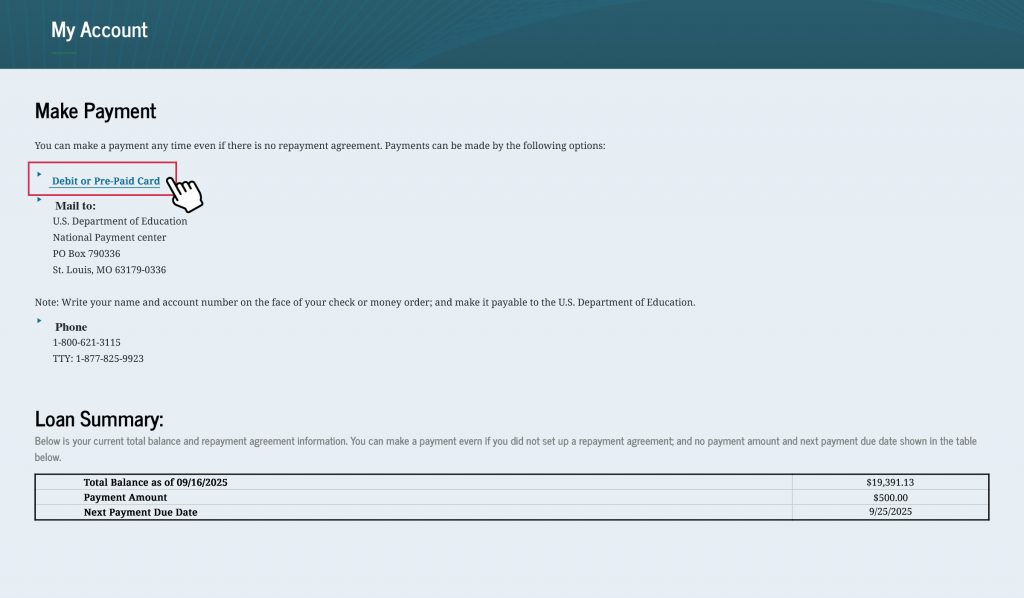
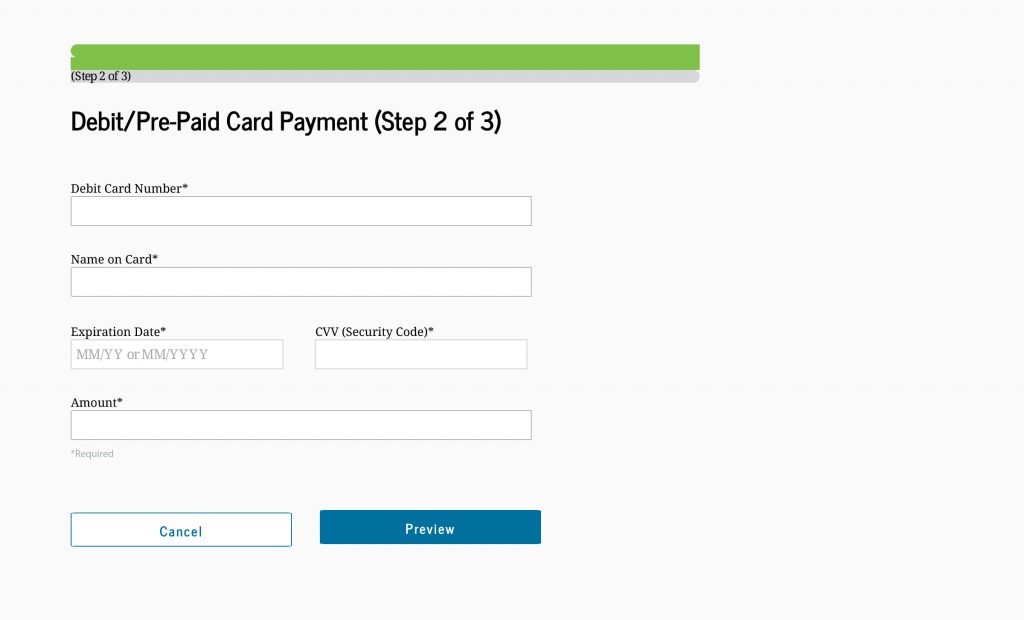
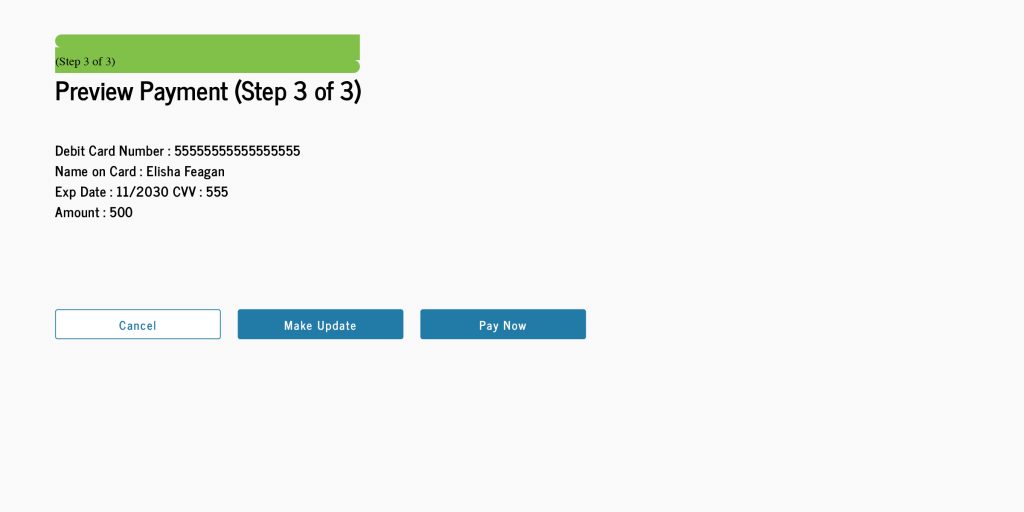
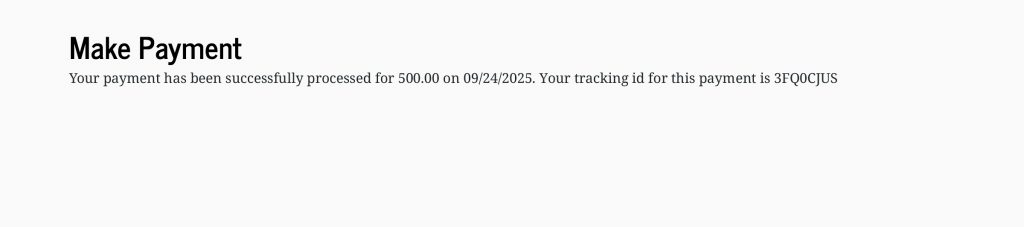
To make an online payment, select “Debit or Pre-Paid Card.” You will first be asked to agree to the terms and conditions. Then you will be able to enter your card information and confirm your payment. A confirmation message will appear with a tracking ID if your payment is successful.
Can’t afford the monthly payment amount in your agreement?
If you can’t afford or are unable to make the monthly payment amount based on the 15% formula proposed in your loan rehabilitation agreement, you can fill out the Loan Rehabilitation Income and Expense form (see detailed instructions for this form).
After submitting the form to your loan holder, an alternative monthly payment amount based on your current financial circumstances (which accounts for vital monthly expenses, such as medical or housing bills) will be sent to you within 10 business days via postal mail. Depending on your individual circumstances, the alternative payment amount might be lower than the payment amount you were initially offered.
6
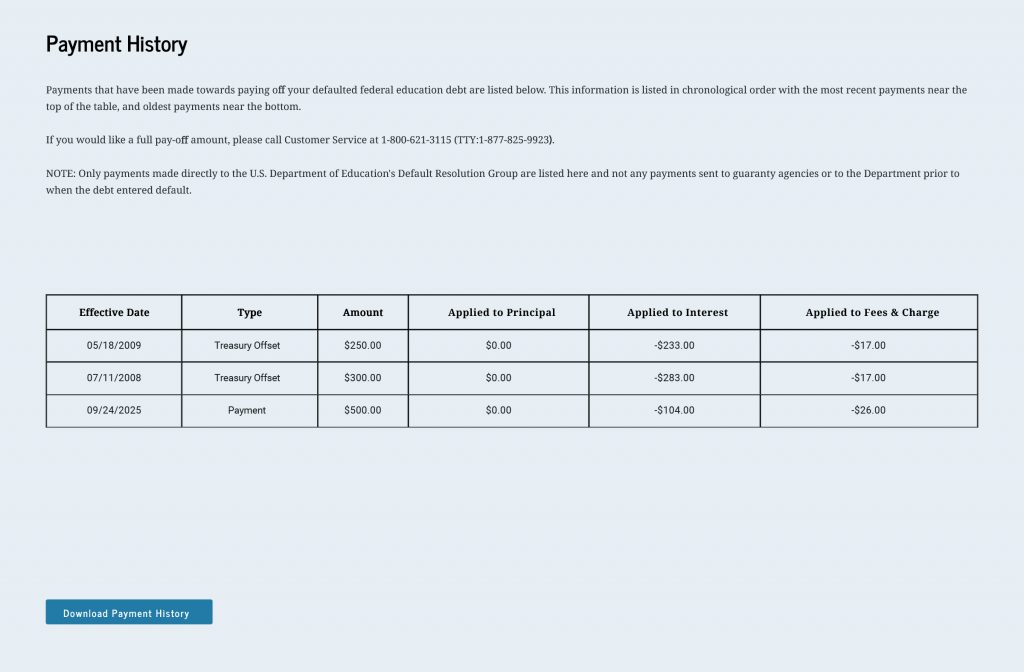
How can I view my involuntary and voluntary payments toward my defaulted student loans?
You can view your payments under the “Payment History” tab of your MyEdDebt.ed.gov Dashboard. It may take up to two business days for your online payment to process and then appear on your account. Payments are applied to fees first, then to loan interest, and finally to your loan’s principal balance.
Involuntary collections, which include wage garnishment and withholding from tax refunds or other federal payments (known as Treasury offset), may continue until your loan is no longer in default or until you have made at least five rehabilitation payments.
7
How do I confirm that I fulfilled my loan rehabilitation agreement?
Under the “Loan Summary” tab on your MyEdDebt.ed.gov Dashboard, you will be able to see if you successfully completed loan rehabilitation. After you finish loan rehabilitation, your loan will be transferred to a different loan servicer, and its name will appear under “Servicer Name.”
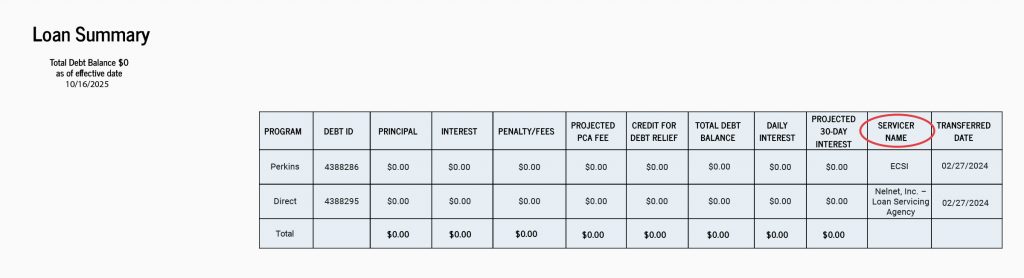
The “Transferred Date” refers to the date your loan was removed from default status and transferred to the new servicer.
After you successfully complete loan rehabilitation, you will also receive an email within 30 days confirming your new loan servicer.
Once your loans are no longer in default, you will be eligible for federal student aid (grants, work-study funds, and loans) again. Your school may request proof that you are no longer in default. Contact DRG to request a letter confirming your loan is no longer in default.
Once your loans are successfully transferred to your new servicer, we recommend using Loan Simulator to help you calculate your estimated monthly student loan payment and choose a repayment plan that meets your needs.