How To Complete the FAFSA® Form When You Have Multiple Children

This article reflects updates to the 2026–27 FAFSA® process, including how to invite contributors to the FAFSA form.
If you have more than one child in college, career school, or trade school, you’ll need to follow five steps when filling out the Free Application for Federal Student Aid (FAFSA®) form:
- You and each of your children will need your own StudentAid.gov account.
- Each child must start their own FAFSA form and complete their required sections.
- Each child will need to invite you to complete their FAFSA form.
- You will accept a separate invitation to complete the FAFSA form for each child.
- You must complete all required parent sections for each child’s FAFSA form.
Read on for more details.
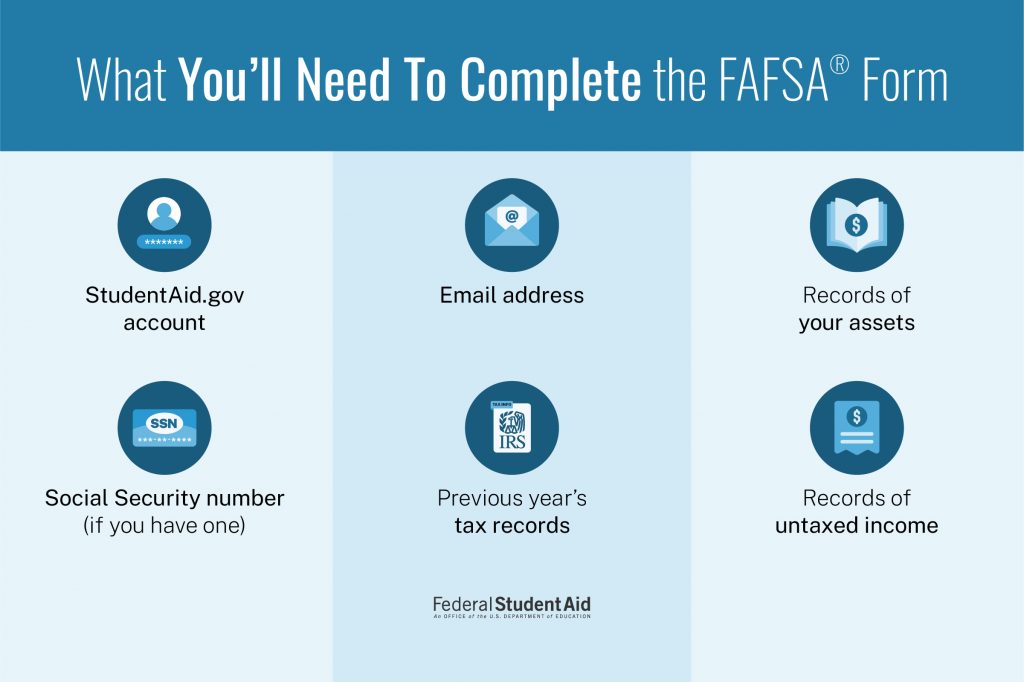
1
You and each of your children will need your own StudentAid.gov account.
In most cases, your children will be considered dependent students and you will be required to participate on their FAFSA forms. To do so, you’ll need a StudentAid.gov account to access their forms.
Your StudentAid.gov account is associated with your Social Security number (SSN) and is unique to you. It serves as your legal electronic signature throughout the financial aid process. You can’t share an account with any of your children or your spouse. You and each of your children will each need your own account.
If you don’t have a SSN, you can still create a StudentAid.gov account to complete and sign your required sections of the FAFSA form online.
Learn more about creating and accessing a StudentAid.gov account:
2
Each child must start their own FAFSA® form and complete their required sections.
The FAFSA form is your child’s application for federal student aid. Each child should start their own FAFSA form and complete the required student sections, provide consent and approval to have their federal tax information transferred directly from the IRS into the form, and sign the form. To prevent errors and save time, we recommend that they complete all of these steps before you fill out the parent sections of their FAFSA form.
If your child doesn’t start the FAFSA form first, or if you and your child are both completing their FAFSA form at the same time, you may have more difficulty completing your required sections or may even spend time providing information that’s not required.
Your children can watch our “Completing the FAFSA Form” video playlist to learn more about starting and completing their sections.
3
Each child will need to invite you to complete their FAFSA® form.
A dependent student is required to invite their parent to participate on their form. Before your child can submit the student section of their FAFSA form, they will complete the “Invite a Parent as a Contributor” section. This means that each of your children will invite you to participate on their form.
Each child will need to invite only one parent when completing the “Invite a Parent as a Contributor” section of their FAFSA form. If your spouse is required as an additional contributor, you’ll invite them to the FAFSA form when you complete the parent sections. Before beginning the FAFSA form, you (or your children) can use the Who’s My FAFSA Parent? wizard to help determine which parent will need to be invited.
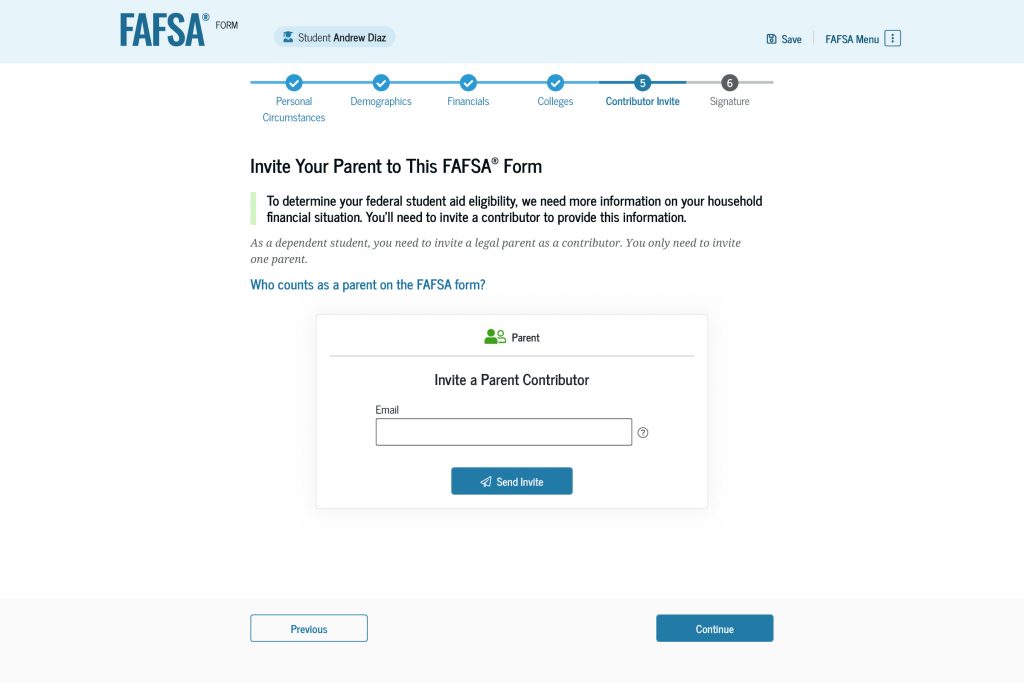
To invite you to the FAFSA form, each child will enter your email address and select “Send Invite.” A pop-up window will appear, asking them to confirm your email address.
Once your child sends the invite, they’ll see a confirmation page. This page will include the unique invitation code for their FAFSA form as well as a direct invitation link. You’ll receive the same information in your invitation email.
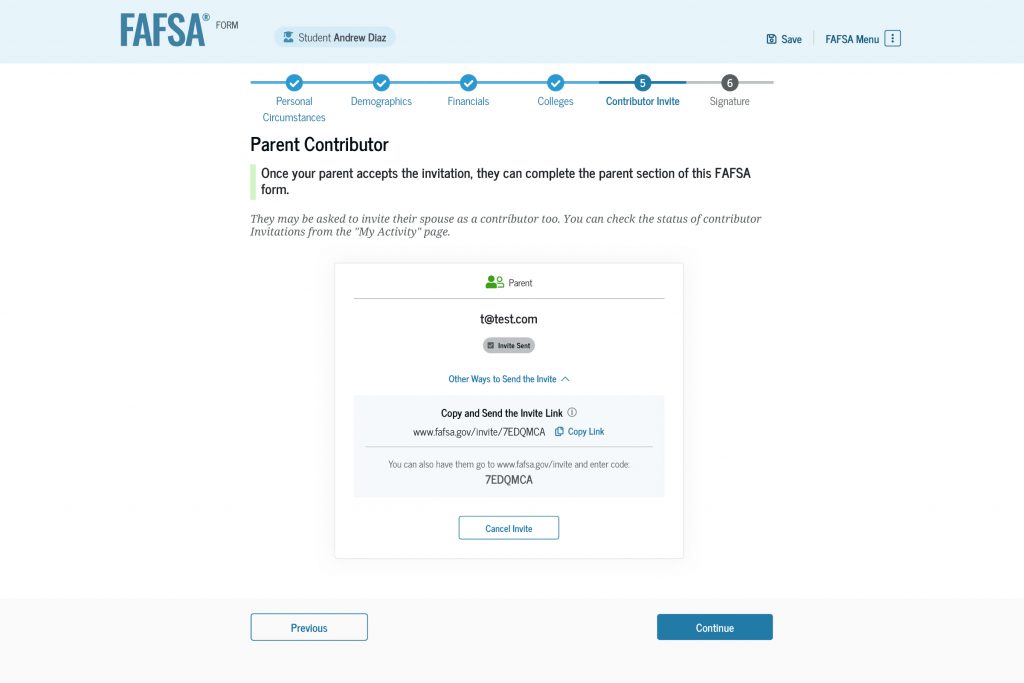
4
You will accept a separate invitation to complete the FAFSA® form for each child.
After each child completes the student sections and invites you to participate on their FAFSA form, you’ll have three ways to accept the invitation:
- your invitation email (recommended method)
- each child’s unique invite link
- the FAFSA landing page at fafsa.gov
You’ll receive an invitation email for each child from Federal Student Aid (noreply@studentaid.gov) with the subject line, “Help [your child’s name] With Their FAFSA Form.” This email will include a direct link to “Accept Invitation” and a unique invitation code for the child. By selecting the link included in the email, you’ll be taken directly to the log-in page and can enter your child’s FAFSA form.
As an alternative method, when each child completes the “Invite a Parent as a Contributor” section of their form, they’ll receive a unique invitation link and code. They can share these directly with you, and you can enter each child’s FAFSA form using their unique link. (This is the same invitation link and code that you received via email.)
As a final option, you can visit the FAFSA landing page at fafsa.gov. On that page, you can select the button for “Accept an Invitation.”
No matter which method you use, you’ll log in to your StudentAid.gov account and be taken to the “Accept FAFSA® Invitation” page. There, a text box will prompt you to enter the unique invitation code for your child. If you selected the link directly from the invitation email, the invitation code will automatically populate in the text box. For all other methods, you’ll need to enter the invitation code.
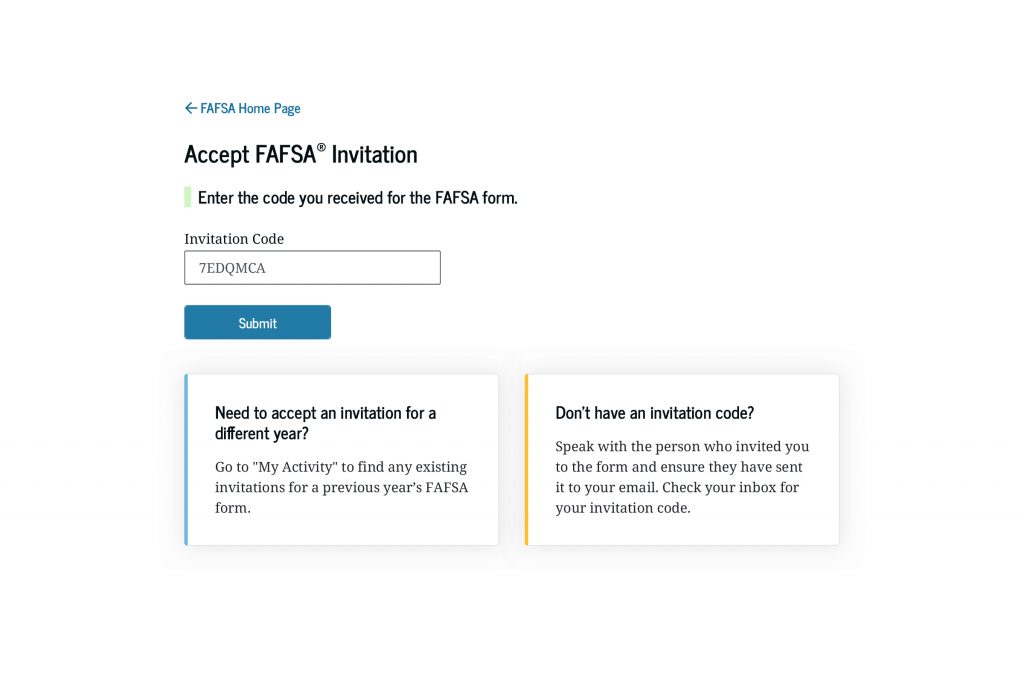
After you submit the code, a pop-up window will appear, asking you to confirm you want to “Accept Invite from [your child’s name].” When you select “Accept,” you’ll begin the parent section of the FAFSA form.
Once you accept the invitation, the FAFSA form for that child will be listed in the “My Activity” section of your StudentAid.gov account Dashboard.
5
You must complete all the required parent sections for each child’s FAFSA® form.
After you enter the first FAFSA form, you’ll need to complete the parent sections, provide consent and approval for the transfer of federal tax information from the IRS into the form, and sign the form. For more details about what you can expect in the parent sections, read “Completing the FAFSA® Form: Steps for Parents”.
Providing your consent and approval is required before your children can be eligible for federal student aid. When you provide consent and approval, you agree to allow the U.S. Department of Education to reuse your federal tax information on the other FAFSA forms you’re invited to, so you will need to provide your consent and approval only once.
How is your financial information used?
The federal tax information that’s transferred into each child’s FAFSA form—along with the additional financial information that you and each child provide in the form—will be used to calculate their Student Aid Index (SAI). The SAI is an eligibility index number that the schools will use to calculate how much federal student aid the child is eligible to receive at that school.
When you complete the “Parent Finances” section of your children’s FAFSA forms, you’ll need to report the value of your child’s education savings accounts as part of your response to the question that asks for your current “Net Worth of Investments, Including Real Estate.” You must report the amount for each child and report the value for just that child, so make sure the child’s name is listed at the top of the FAFSA form to avoid errors. You shouldn’t include your other children’s education savings accounts or enter a total savings for all children.
What happens next?
After you complete the parent sections, you’ll sign the FAFSA form. You must sign each child’s FAFSA form for it to be complete. After your information, consent and approval, and signature are provided—and if your child has completed the required student sections—you’ll see a confirmation page informing you that your child’s FAFSA form is complete.
After completing your first child’s FAFSA form, you can return to Step 4 and follow the same steps to enter and complete your next child’s FAFSA form.
Each child’s FAFSA form has its own unique invitation code, so make sure you enter the correct code. If you mistype or use the wrong code, you’ll receive an error message. Remember: When you select the link directly from the invitation email, the invitation code will automatically populate.
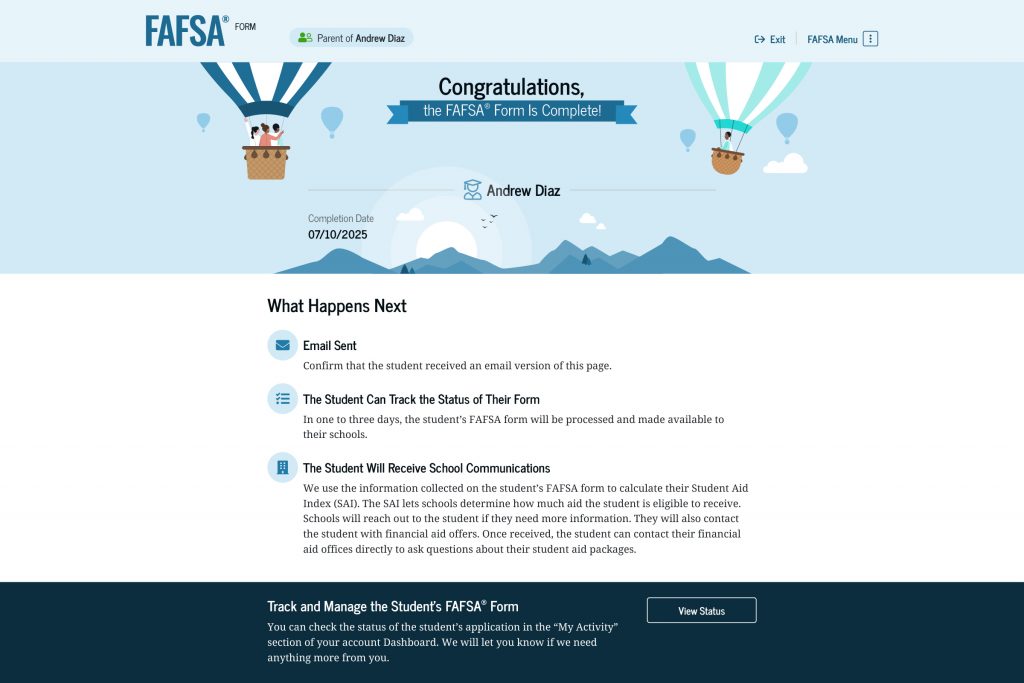
After each child’s FAFSA form is submitted, you and your children will be able to track the status of their forms. The colleges, career schools, or trade schools they listed on their forms will send financial aid offers if they’re accepted for admission. Review each aid offer with your children, and understand what options are available if your child didn’t receive enough aid to cover the cost of school.